




2nd March 2026BY Nihang Law
IRCC’s AI Strategy and Canadian Immigration: What It Means for Ontario Applicants
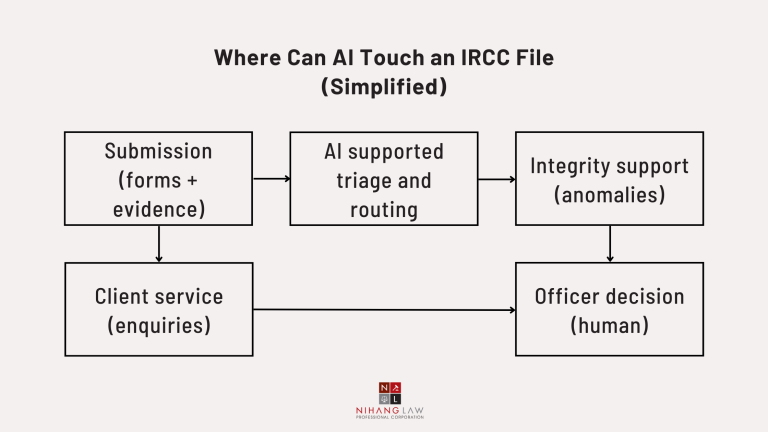
Many Ontario applicants—and the lawyers and consultants assisting them—are noticing a confusing pattern: some files move surprisingly fast, while others sit for months. And when a refusal comes, the wording can sometimes feel “template-like.” That’s where IRCC’s Artificial Intelligence (AI) Strategy becomes relevant. IRCC recently published it to clarify three things: where AI is used (triage, routing, and support tools), what it is not used for (autonomous refusals), and the safeguards meant to govern automation.
In a system designed to move high volumes, a strong record is your best protection. If your documents and timeline are consistent, your file is easier to assess and less likely to get slowed down by avoidable questions.
Disclaimer: This article is general information, not legal advice. Immigration outcomes are fact-specific and deadline-driven. Get legal advice from our immigration team about your situation before acting.
Quick Start: Pick Your Situation
- I’m applying now (TRV, study permit, work permit, PR): focus on the “triage-proof” preparation tips.
- I was refused: use the step-by-step roadmap and check judicial review deadlines immediately.
- I’m an Ontario employer supporting a work permit or LMIA process: tighten job evidence and consistency.
- I’m an Ontario employer supporting a work permit or LMIA process: tighten job evidence and consistency.
- I’m choosing a representative: verify licensing through the Law Society of Ontario.
What is IRCC’s Artificial Intelligence Strategy, in plain English?
IRCC’s Artificial Intelligence Strategy is its public roadmap for using AI to improve processing efficiency, client service, and program integrity. It describes what IRCC is already doing (for example, triage and analytics support) and the principles it says will guide future use, including human accountability, transparency, privacy protection, and reliability.
If you want the source document, start with IRCC’s Artificial Intelligence Strategy (and the PDF version if you prefer a printable copy). PDF
Nihang Law Insight: Most clients don’t need to “fight AI.” They need a file that survives triage: clear facts, consistent documents, and short explanations for anything unusual. If a concern is visible on paper (a missing tie, unexplained deposits, inconsistent job history), AI-supported workflows can surface it faster—but the fix is still evidence and clarity.
Does IRCC Use AI to Refuse Applications?
IRCC publicly states that its tools do not refuse or recommend refusing applications, and that it does not use autonomous AI agents that can refuse client applications. AI may support sorting, summarizing, and integrity checks, but a human officer remains responsible for the final refusal decision.
This point appears directly in IRCC’s AI Strategy and is echoed in IRCC transparency materials (for example, question period notes on AI use).
What “human decision-maker” means in practice
Even when a tool helps route or summarize a file, officers must still decide under the Immigration and Refugee Protection Act and Regulations. The decision should be explainable, defensible, and based on the record—so structure and evidence still win.
Where Can AI Touch Your File in Real Life?
IRCC describes AI and automation as most common in high-volume tasks: triaging applications by complexity, routing straightforward files for faster review, supporting integrity screening (anomalies and patterns), and managing client enquiries. IRCC also says it has used machine-learning predictive analytics since 2018 to support triage design and workload distribution across its processing network.
For IRCC’s own description of these uses, see IRCC’s AI Strategy and its page explaining advanced analytics and automation in processing.
A nuance many people miss: “Automation” can still change outcomes
Even if a tool does not refuse applications, it can influence timing and workflow. IRCC has described using advanced analytics to sort and triage certain Temporary Resident Visa (TRV) applications and to support some positive eligibility determinations, while stating the system does not make the final decision.
Source: CIMM note on advanced data analytics and TRVs
What Safeguards Apply When Government Uses AI?
Federal AI and automated decision-support is expected to be governed by transparency, accountability, fairness, quality assurance, privacy protection, and meaningful recourse. Treasury Board guidance says departments should assess impacts, be transparent about use, ensure quality, provide recourse options, and report publicly. These safeguards matter because they affect documentation and reviewability.
Key governance sources include: Guide on the Scope of the Directive on Automated Decision-Making; and the Algorithmic Impact Assessment (AIA) tool.
Safeguard 1: Impact assessment and risk controls (AIA)
The AIA is a structured questionnaire intended to measure impact and require mitigations for higher-risk systems. For applicants, the takeaway is that government should document risk, testing, and oversight when automation affects people.
Safeguard 2: Privacy-by-design and PIAs
Where personal information is used, privacy governance is shaped by the Privacy Act, and departments often use Privacy Impact Assessments (PIAs). For background, see the Office of the Privacy Commissioner of Canada guide to PIAs and its AI and privacy resources.
Privacy tip for clients and employers: Be cautious about uploading passports, bank statements, or identity documents into public AI chatbots. If you use AI to help draft a letter, redact personal data, verify every sentence, and keep a clean “source package” of originals that supports each claim.
What Should You Do Differently When Preparing An Application?
Prepare your file as if it will be triaged: make it consistent, complete, and easy to verify. Use a clear timeline, matching names and dates across documents, and short explanations for anything unusual (large deposits, job gaps, travel changes). Ontario employers should support work-related letters with objective proof, not generic templates.
For applicants: build a “triage-proof” package
- Consistency beats volume: one coherent story that matches the documents is stronger than a huge, disorganized upload.
- Explain the “unusual” items upfront: large deposits, gift funds, employment gaps, sudden travel changes—explain with proof.
- Make it officer-friendly: a one-page cover letter, document index, and labeled exhibits reduce misunderstandings.
- Use AI only for wording, not facts: if a letter sounds polished but contains errors, credibility can be damaged across future applications.
For Ontario employers: credibility is an evidence trail
- Show the job is real: duties, wage, hours, location, supervision, and business need—then back it with payroll records, contracts, invoices, or org charts where appropriate.
- Avoid copy-paste templates across multiple files: identical wording can look manufactured. Customization is credibility, not fluff.
- Keep compliance documents organized: if scrutiny happens, you want a clean audit trail that matches what you submitted.
What Are the Common Mistakes We See in Ontario Matters?
The biggest “AI problems” are usually human problems: using unlicensed representatives, submitting inconsistent documents, relying on AI-written stories that do not match proof, and missing strict timelines after refusal. Ontario clients also sometimes file in the wrong court—immigration judicial review is typically Federal Court, not the Ontario Superior Court of Justice.
- Not verifying your representative: Ontario lawyers and paralegals are regulated by the Law Society of Ontario (LSO). Verify status before paying for legal services.
- Inconsistent identity details: name spellings, dates of birth, addresses, and job history must match across forms and documents.
- Over-polished letters with factual errors: AI can generate confident-sounding text that is wrong; contradictions often become credibility issues.
- Waiting too long after refusal: reconsideration, re-application, or judicial review analysis should start immediately.
- Confusing legal forums: Ontario Superior Court of Justice handles many provincial civil disputes; immigration judicial review is generally Federal Court.
Verify licensing here: Law Society of Ontario directory. For court forum reference: Ontario Superior Court of Justice vs. Federal Court immigration judicial review guidance.
Step-by-Step Roadmap If You Were Refused or Your File is Stuck
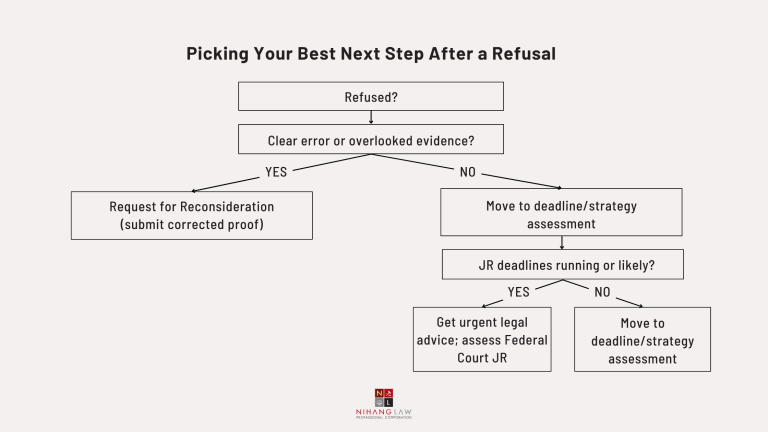
Start by protecting deadlines and rebuilding the record, not by arguing “AI is unfair.” Save the decision and your submission proof, identify the real refusal grounds, request notes where appropriate, fix objective gaps, and decide whether to re-apply, seek reconsideration, or pursue judicial review. Timing can be as short as 15 or 60 days under IRPA section 72.
- Freeze the timeline: save the refusal letter, portal screenshots, submission confirmations, and everything you filed.
- Read the reasons like a checklist: ties, funds, purpose, genuineness, credibility, compliance history—what exactly did the officer find lacking?
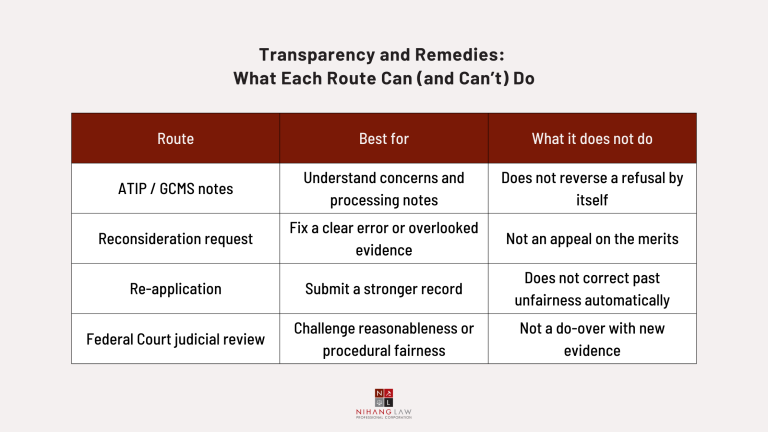
- Consider requesting notes: an ATIP/GCMS request can clarify recorded concerns (but it does not pause legal deadlines).
- Fix gaps with objective proof: employment verification, tax records, bank explanations, property documents, affidavits where appropriate.
- Use reconsideration strategically: best when there is a clear error, overlooked evidence, or missing document—not just disagreement.
- Assess judicial review immediately: under IRPA section 72, an application for leave and judicial review is generally filed within 15 days (matters arising in Canada) or 60 days (matters arising outside Canada).
- Choose a strategy: sometimes a stronger re-application is faster; sometimes judicial review is needed to correct unfairness.
Deadline sources: IRPA section 72 and the Federal Court guide (immigration judicial review). IRCC’s overview is here: Apply to the Federal Court of Canada for judicial review.
Nihang Law Insight: Clients often want to challenge “the system.” The winning move is usually narrower: challenge the decision using a clean record and correct legal framing. Officers—and courts—care about evidence, reasoning, and procedural fairness.
Can You Request Records About Automation, Flags, or Processing Notes?
You can often request government-held records about your immigration file through access-to-information and privacy processes. These may include officer notes and processing annotations that help you understand concerns. These requests do not automatically change the decision, but they can guide a smarter re-application, reconsideration request, or judicial review strategy.
Start with the federal overview of access and privacy: Treasury Board Secretariat — Access to Information and Privacy. Primary legislation: Access to Information Act and Privacy Act.
How Can a Lawyer Help, and Which Legal entities matter in Ontario?
A lawyer can protect deadlines, identify the true refusal ground, and rebuild your evidence for officer review or court scrutiny. In Ontario, verify representation through the Law Society of Ontario. If litigation is necessary, immigration judicial review is generally in the Federal Court of Canada, while the Ontario Superior Court of Justice deals with many provincial civil disputes.
Counsel can also reduce credibility risk by ensuring the narrative matches the documents and by planning whether to refile, request reconsideration, or litigate.
FAQ: Canada Immigration and Artificial Intelligence
Most “AI in immigration” questions come down to three issues: whether AI can refuse you (IRCC says no), how AI affects processing (triage, routing, and integrity support), and what you can do (build consistency, protect privacy, and move quickly after a refusal).
Is IRCC using ChatGPT to decide applications?
IRCC describes a mix of automation types (rules-based tools, machine learning, and language tools). It does not describe autonomous chatbots making refusal decisions; officers remain responsible for refusals.
Can AI cause delays?
AI-supported triage can route files differently based on complexity or integrity indicators. Delays still commonly relate to verification needs, volume, and officer review.
If IRCC says tools don’t refuse, why was I refused so fast?
Fast refusals often happen when an officer can decide quickly on the existing record (for example, missing ties or weak financial evidence) or where key documents are inconsistent.
Can I ask whether AI was used on my file?
There is no universal checkbox disclosure for every case, but you can request records/notes through access-to-information and privacy processes to better understand processing and concerns.
Should I stop using AI tools to draft my letters?
You can use AI for wording, but never for facts. Redact personal data, verify every sentence, and ensure every claim is supported by documents you can produce.
What is the fastest next step after refusal?
It depends. Some cases are best re-filed stronger; others require urgent legal assessment for judicial review. Don’t wait if deadlines may apply.
Does an ATIP request fix my refusal?
No. ATIP is mainly for understanding your file. It can help you build a better strategy, but it does not reverse the decision by itself.
Which court handles immigration judicial review?
The Federal Court of Canada generally handles immigration judicial review. The Ontario Superior Court of Justice handles many Ontario civil disputes, but not routine review of IRCC refusal decisions.
Reminder: This guide is general information, not legal advice. If you have a refusal or a deadline concern, get advice promptly.
Talk to Nihang Law Today
Immigration shouldn’t feel like guessing what IRCC wants. With AI-supported triage and tight timelines, your file needs to be clear, consistent, and easy to trust.
Nihang Law helps turn “a pile of documents” into a record that makes sense to an officer. If you’re facing a refusal, delays, or a complicated history, book a consultation and we’ll map the smartest next step.
Sources & References
- IRCC — Artificial Intelligence Strategy — https://www.canada.ca/en/immigration-refugees-citizenship/corporate/transparency/artificial-intelligence-strategy.html
- IRCC — Artificial Intelligence Strategy (PDF) — https://www.canada.ca/content/dam/ircc/documents/pdf/english/corporate/transparency/artifical-intelligence-strategy/artifical-intelligence-strategy.pdf
- IRCC — Advanced analytics and automation for processing applications — https://www.canada.ca/en/immigration-refugees-citizenship/corporate/transparency/digital-transparency-advanced-data-analytics/processing-applications.html
- IRCC — CIMM note: Advanced data analytics for TRV applications — https://www.canada.ca/en/immigration-refugees-citizenship/corporate/transparency/committees/cimm-may-12-2022/advanced-data-analytics-sort-help-process-temporary-resident-visa-applications.html
- IRCC — Question Period Note: Use of AI in decision-making at IRCC (Nov 29, 2022) — https://www.canada.ca/en/immigration-refugees-citizenship/corporate/transparency/committees/cimm-nov-29-2022/question-period-note-use-ai-decision-making-ircc.html
- Treasury Board of Canada Secretariat — Guide on the Scope of the Directive on Automated Decision-Making — https://www.canada.ca/en/government/system/digital-government/digital-government-innovations/responsible-use-ai/guide-scope-directive-automated-decision-making.html
- Government of Canada — Algorithmic Impact Assessment (AIA) tool — https://www.canada.ca/en/government/system/digital-government/digital-government-innovations/responsible-use-ai/algorithmic-impact-assessment.html
- Justice Laws — Immigration and Refugee Protection Act, section 72 (judicial review) — https://laws.justice.gc.ca/eng/acts/i-2.5/section-72.html
- Federal Court of Canada — How to file an Application for Leave and for Judicial Review (Immigration) — https://www.fct-cf.ca/en/pages/representing-yourself/practice-guides/how-to-file-an-application-for-leave-and-for-judicial-review-immigration
- IRCC — Apply to the Federal Court of Canada for judicial review (overview) — https://www.canada.ca/en/immigration-refugees-citizenship/services/refugees/protection/refusal-options/federal-court-review.html
- Treasury Board Secretariat — Access to Information and Privacy (overview) — https://www.canada.ca/en/treasury-board-secretariat/services/access-information-privacy.html
- Justice Laws — Access to Information Act — https://laws-lois.justice.gc.ca/eng/acts/a-1/
- Justice Laws — Privacy Act — https://laws-lois.justice.gc.ca/eng/acts/p-21/
- Office of the Privacy Commissioner of Canada — Guide to the PIA process — https://www.priv.gc.ca/en/privacy-topics/privacy-impact-assessments/gd_exp_202003/
- Office of the Privacy Commissioner of Canada — Privacy and AI — https://www.priv.gc.ca/en/privacy-topics/technology/artificial-intelligence/
- Law Society of Ontario — Lawyer and Paralegal Directory — https://lso.ca/public-resources/finding-a-lawyer-or-paralegal/lawyer-and-paralegal-directory
- Ontario Superior Court of Justice (official site) — https://www.ontariocourts.ca/scj/
Thank you for reading this post, don't forget to subscribe!